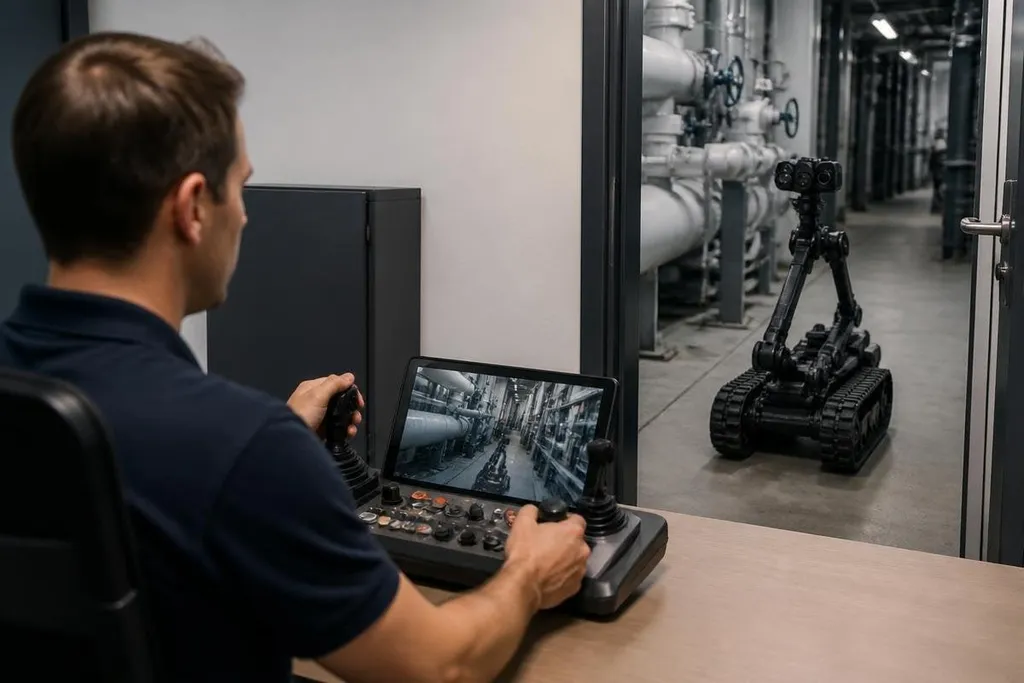
A remote operator can see through a robot, speak through it, and move its body from far away. That can make a distant site feel less like a video call, but only when the robot carries enough useful detail back to the person controlling it.
- Cameras show the room; motion controls let the operator act inside it.
- Delay between a command and a robot’s response can make movement hard to judge.
- Sound, touch, safety, and setup decide if remote presence works outside a demo.
Seeing is only the first layer
A camera gives the operator a view, but one flat image leaves out distance and scale. Two cameras set apart can create stereo vision, which helps a person judge depth. A movable camera can also let them look around an object instead of waiting for someone nearby to adjust the view.
Mounted on a fixed base, the camera may show a wide room, while one on a head or arm can follow the operator’s focus. That movement has to stay smooth. If the view swings past the object, the person controlling the robot spends time correcting the camera instead of doing the task.
Sound adds another layer. A microphone near the robot can carry speech from the room, while speakers let the remote operator talk to people nearby. The system needs to separate speech from motor noise, because a fan or gearbox can cover a quiet voice at the other end.
The controls must match the body
Remote presence becomes more convincing when the operator’s actions map clearly to the robot. A hand controller can move a robot arm, while foot controls can send a mobile base forward or backward. Some systems use motion tracking so the robot copies the operator’s arm or head movement.
That mapping has limits. A human arm can move through positions that a robot arm cannot reach, and a mobile robot may turn more slowly than the operator expects. Software must block unsafe commands, limit speed near people, and stop the robot when its connection drops.
The delay between an operator’s command and the robot’s response is called latency.
A short delay may go unnoticed during speech, but it becomes obvious when someone tries to place an object, guide a tool, or drive through a narrow doorway. Remote presence needs controls that show the robot’s current state, not only the command the operator sent.
Touch is harder than video
Video can show that a gripper reached a cup. It may not tell the operator how firmly the fingers hold it. Force sensors can measure pressure at the gripper, then send that data back through vibration or resistance in the controller. This is called haptic feedback.
Haptic feedback could help with tasks that depend on contact. A person might feel when a tool touches a surface or when a gripper starts to slip. The open problem is timing: delayed force feedback can confuse the operator, especially when the robot and the person are separated by a slow network.
The robot also needs a stable base, a clear view of its work area, and a safe stop system that people nearby can reach. A remote operator can make a decision, but they cannot see every cable, person, or loose object around the robot.
Where remote presence may work first
Remote presence makes the most sense where a person needs to inspect or guide work but cannot reach the site quickly. A robot could let a specialist examine equipment, speak with staff, or guide a task from another location. The machine does not need to act alone for that link to matter.
The harder case is work that needs fast reactions, exact touch, or repeated movement for hours. Those tasks expose the cost of latency, battery limits, network loss, and operator fatigue. A camera view can feel close to the room while the controls still feel far away.
Those limits make the task the right place to start. Robot24.com's remote-presence reporting can put the robot's controls, network link, battery, and operator role beside the work it must do, so you can judge presence by results rather than appearance.
I’d judge remote presence by the task, not by how human the robot looks. A plain wheeled base with a good camera, microphone, speaker, and safe arm may help more than a walking robot that looks like a person but gives poor control.
A practical test before buying
Use this checklist when comparing a remote presence system:
- Name the task: Write down the object the operator must inspect, move, or discuss.
- Check the delay: Test movement over the network connection used at the real site.
- Test depth: Ask the operator to judge gaps, edges, and object distance from the robot’s view.
- Add sound: Check speech in the presence of motors, fans, alarms, and room noise.
- Try contact: Test gripping or tool use with force feedback if touch affects the work.
- Plan the stop: Put a reachable emergency stop near people who share the robot’s space.
A useful system should let the operator answer three practical questions at any moment: Where is the robot? What is it touching? What will happen after the next command? Remote presence will feel real when those answers arrive soon enough to guide safe action, not when the robot merely appears on screen.